


NEW! Data443 Acquires VaikoraReal-Time AI Runtime Control & Enforcement for AI Agent

Vaikora AI Agent Signals for Microsoft Sentinel

Vaikora feeds real-time AI agent behavioral signals into Microsoft Sentinel, giving your SOC the visibility to detect, investigate, and respond to risky agent actions — including prompt injection, goal hijacking, and unauthorized data access.

5-Minute Deployment · Real-Time Risk Scoring  · Pre-Built Detection Rules

What Is Vaikora AI Agent Signals
for Microsoft Sentinel?

Vaikora acts as a native data connector, streaming behavioral signals from every AI agent in your environment into a custom Log Analytics table. Your existing analytic rules, workbooks, and incident workflows handle the rest — no new tooling required.

AI Agents Are the New Blind Spot

  • Your organization is deploying AI agents for automation, customer service, code generation, and data processing
  • These agents make autonomous decisions, call external APIs, and access sensitive resources
  • Your SIEM has zero visibility into what those agents are actually doing
  • When an agent behaves unexpectedly, there’s no alert, no investigation path, no response playbook

AI agents operate in a security blind spot. Vaikora turns the lights on.

Vaikora monitors every action your AI agents take, scores risk across 7 dimensions (including prompt injection detection), and feeds high-severity findings directly into Microsoft Sentinel as incidents — giving your SOC full visibility into autonomous AI behavior from the SIEM it already uses.

Vaikora + Microsoft Sentinel. Full Visibility. Native Integration.

How Does Vaikora Integrate with Microsoft Sentinel?

Vaikora monitors every action your AI agents take, scoring each one across 7 risk dimensions — behavioral anomalies, policy compliance, threat indicators, data exfiltration signals, prompt injection patterns, scope violations, and resource access risk. Those signals flow directly into Microsoft Sentinel through a native data connector, where your existing detection rules, workbooks, and incident response workflows take over.

  • Vaikora monitors every agent action: API calls, data access, tool use, resource requests — intercepting at the function boundary before execution
  • Risk engine scores each action (0–100) and flags anomalies using ML-based behavioral analysis
  • Policy engine evaluates actions against your rules (allow, block, audit) using an OPA-compatible policy model
  • Sentinel connector ingests all signals into the Vaikora_AgentSignals_CL custom table
  • Analytic rules fire on high-risk actions, anomalies, and policy violations, creating Sentinel incidents

Your SOC works AI agent incidents the same way they work any other security incident.

What You Get

Key Features

Native Sentinel Data Connector

REST API poller connector, certified for Content Hub. Installs like any other Sentinel data connector. Polls every 6 hours.

17-Column Custom Log Table

Vaikora_AgentSignals_CL captures everything: risk scores, anomaly flags, policy decisions, threat indicators, action metadata, and timestamps.

3 Pre-Built Analytic Rules

Ship disabled, ready to enable:
• High Risk AI Agent Action: risk_score >= 75, severity high/critical. Fires every hour.
• Behavioral Anomaly Detected: ML anomaly flag with score >= 0.7. Fires every 30 minutes.
• Agent Policy Violation: any action blocked by policy. Fires every 15 minutes.

Agent Signals Dashboard

Workbook with signal overview tiles, actions-over-time charts, severity breakdowns, anomaly timelines, and recent high-risk actions table.

Content Hub Certified

One-click install from Microsoft Sentinel Content Hub. No custom code.

Zero Maintenance

Connector polls automatically. Rules evaluate continuously. Dashboard updates in real time.
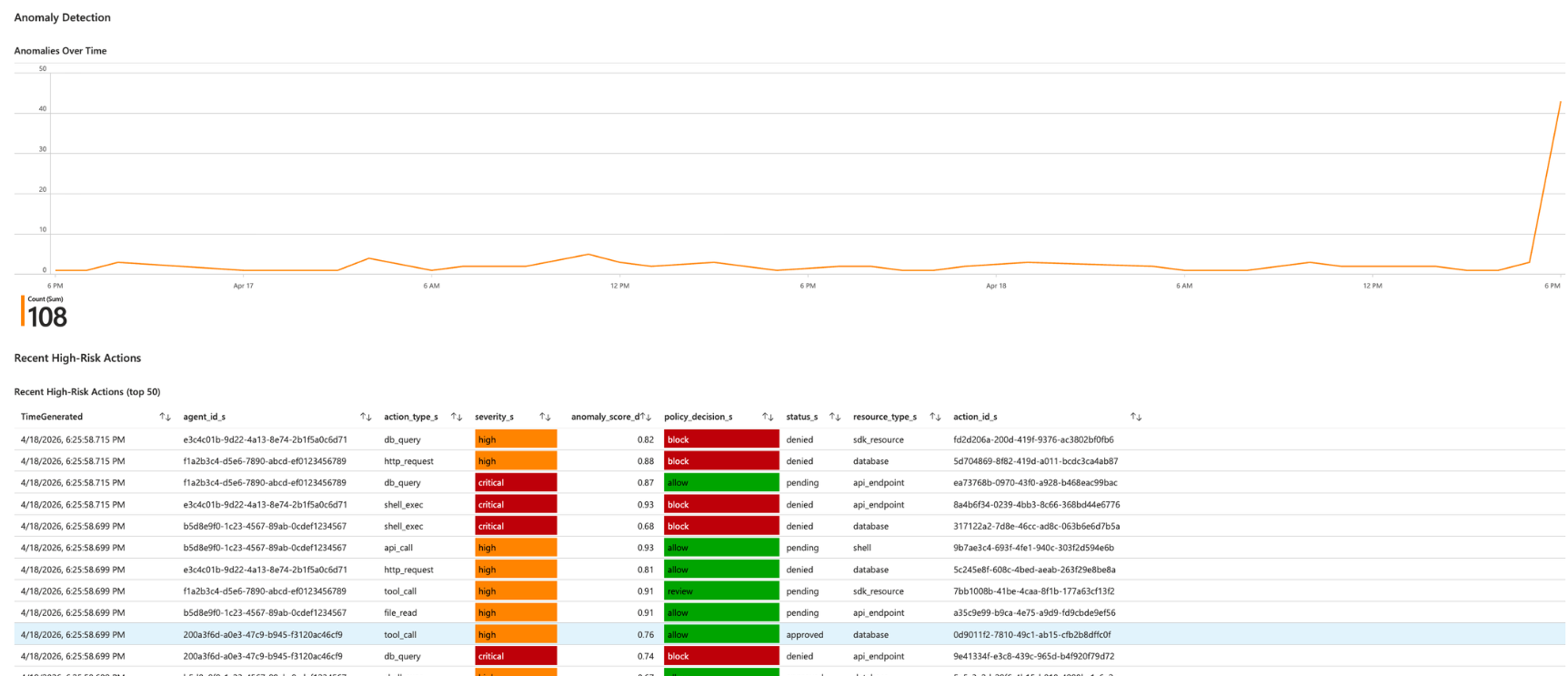
Anomaly Detection Over Time

Your AI Agents Are Making Decisions Right Now. Can You See What They're Doing?

Get real-time visibility into AI agent behavior — including prompt injection attempts, scope violations, and behavioral anomalies — directly in your Sentinel workspace.

Signal Schema

What Vaikora Tracks for Every Agent Action

risk_score (0-100)

7-factor composite risk level for this specific action

anomaly_score (0.0-1.0)

How far this action deviates from the agent's baseline

is_anomaly

Boolean flag, true when behavior exceeds anomaly threshold

anomaly_reason

Human-readable explanation of why the anomaly was flagged

policy_decision

Allow, block, or audit, based on your security policies

threat_detected

Boolean, true when confirmed malicious activity is identified

threat_score (0-100)

Confidence that the action is genuinely malicious

severity

Low, medium, high, or critical

action_type

What the agent did (API call, data access, tool invocation, etc.)

resource_type

What the agent accessed

Who It’s For

Built For Organizations That

Deploy autonomous AI agents in production environments — including LangChain, AutoGen, CrewAI, RPA bots, or custom-built agents

Run Microsoft Sentinel as their SIEM

Want to detect AI agent manipulation (prompt injection, goal hijacking, data exfiltration)

Need AI governance and compliance audit trails for  SOC 2, HIPAA, or GDPR

Require incident response workflows for AI-related security events

Industries

Top Use Cases

Healthcare

Track AI agents accessing patient records, flag anomalous PHI access; support HIPAA compliance

Financial Services

Monitor AI trading agents and detect unauthorized transaction patterns; satisfy PCI DSS audit requirements

Technology

Watch code generation agents for IP exfiltration and supply chain risk

Government

Maintain immutable audit trails for AI agents processing classified or sensitive data

Retail

Monitor customer-facing chatbots for manipulation, prompt injection, and data leakage

Comparison

Why Vaikora + Microsoft Sentinel vs. Alternatives

Factor Custom SIEM Rules AI Observability Manual Review Vaikora for Sentinel
Setup
Weeks of dev
Hours + new platform
Ongoing effort
5 minutes ✅
SOC Integration
Partial
None
Manual
Native Sentinel ✅
Risk Scoring
Build it yourself
Different format
Subjective
7-factor, 0–100 ✅
Prompt Injection
Custom logic
Limited
None
Built-in, multi-vector ✅
Anomaly Detection
Custom ML needed
Dev-focused
No
Built-in ML ✅
Compliance Reporting
Manual
None
Manual
SOC 2, HIPAA, GDPR, PCI DSS ✅
Maintenance
High
Medium
Very high
Zero ✅

Your AI Agents Are Autonomous.
Your Security Shouldn't Be Blind.

How Do I Deploy Vaikora for Microsoft Sentinel?

Three Steps. Five Minutes. Done.

Step 1: Install from Content Hub (2 min)

Open Microsoft Sentinel, go to Content Hub, search “Vaikora”, click Install

Step 2: Enter API Credentials (2 min)

Open the Vaikora data connector, enter your Vaikora API key and Agent ID, click Connect

Step 3: Enable Analytic Rules (1 min)

Go to Analytics, find the three Vaikora rule templates, enable them

Data flows within the first polling window. No coding. No consultants.

Vaikora for Sentinel FAQs

What types of AI agents does Vaikora monitor?

Any autonomous agent that makes API calls, accesses data, or interacts with external systems. This includes LLM-based agents (LangChain, AutoGen, CrewAI), RPA bots, trading algorithms, code assistants, and custom automation agents.

How often does the connector poll for new signals?

Every 6 hours by default. Each poll retrieves all actions since the last successful run.

Does Vaikora work without Microsoft Sentinel?

Sentinel is one of four supported platforms. Vaikora also integrates with CrowdStrike Falcon, SentinelOne, and Azure Security Center. AWS Security Hub support is planned.

Does Vaikora detect prompt injection attacks?

Yes. Vaikora’s threat detection layer includes multi-vector prompt injection detection across nested payloads. When an agent receives a manipulated instruction, the action is flagged, scored, and surfaced as an incident in Sentinel.

Which compliance frameworks does Vaikora support?

Vaikora generates hash-chained, tamper-evident audit logs that support SOC 2 Type II, HIPAA, GDPR, PCI DSS, and ISO 27001. The Sentinel integration makes those records queryable directly in your SIEM.

Can I create custom analytic rules on Vaikora data?

Yes. The Vaikora_AgentSignals_CL table is a standard Log Analytics table. Write any KQL query you want. The three pre-built rules are starting points, not limits.